6/6/2017
Getting Started - iOS Tutorial (1/6)
Welcome to the 1st exercise in the iOS Track of this Apollo Client Tutorial! If you prefer React, React Native, Angular 2 or Vue.js over iOS, head over to the respective tutorial track.
Note: This tutorial assumes a basic familiarity with GraphQL and focusses on functionality of the Apollo iOS Client. If you want to learn more about the used GraphQL concepts, visit learngraphql.
Goal
The goal of this exercise is to get your environment set up so you can use the Apollo iOS Client in Xcode.
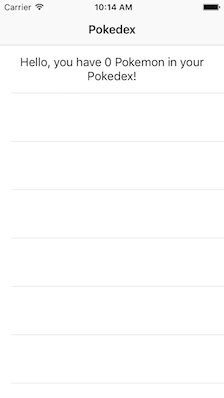
By the end of this exercise you will have a running Xcode project in which you can use the Apollo iOS Client. The app will display a generic greeting in a table view, telling you that you don't have any Pokemons in your Pokedex yet.
Introduction
Sign up with GitHub to receive your own pokedex-apollo project here:
Now change to the folder that contains the 1st exercise (exercise-01) and open pokedex-apollo.xcworkspace. We need to use the .xcworkspace file because we are using Cocoapods for managing dependencies.
As you can see, there is already one dependency included in the project. This dependency is Alamofire, which we are going to use to make networking calls to fetch the images for our Pokemons.
The app so far only consists of one table view controller that will display two sections. The first section right now only contains a generic greeting from the prototype cell in Storyboard, the second section will be used to actually display the Pokemons you catch.
Installing The Apollo iOS Client With Cocoapods
The Apollo iOS client can be installed through Cocoapods or Carthage. Since we are using Cocoapods in this project, go ahead and open the Podfile and add the following line:
pod 'Apollo'
After you executed this step, navigate to the root directory of the project in a terminal and run pod install.
Setting up the Apollo Environment
Unlike most other dependencies that are installed with Cocoapods, we are not quite done with setting up the environment after running pod install. That is because the Apollo iOS client depends on an additional tool called apollo-codegen. With every time you build the Xcode project, this tool needs to run before the actual compilation process. The reason for this is that the tool will scan your project for any .graphql files and generate a Swift file called API.swift which contains your GraphQL types. A major advantage of this approach is that we can leverage the Swift type system to make sure we are only querying data that we need, and the compiler will catch any potential issues for us before runtime.
Note: The Apollo iOS Guide also contains detailled information about setup and usage of the Apollo iOS client.
Install apollo-codegen
You first need to globally install apollo-codegen on your machine using the node package manager (npm) with the following command:
npm install -g apollo-codegen
Adding a Build Phase
The next step is adding a Build Phase to the Xcode project. Execute the following instructions to do so:
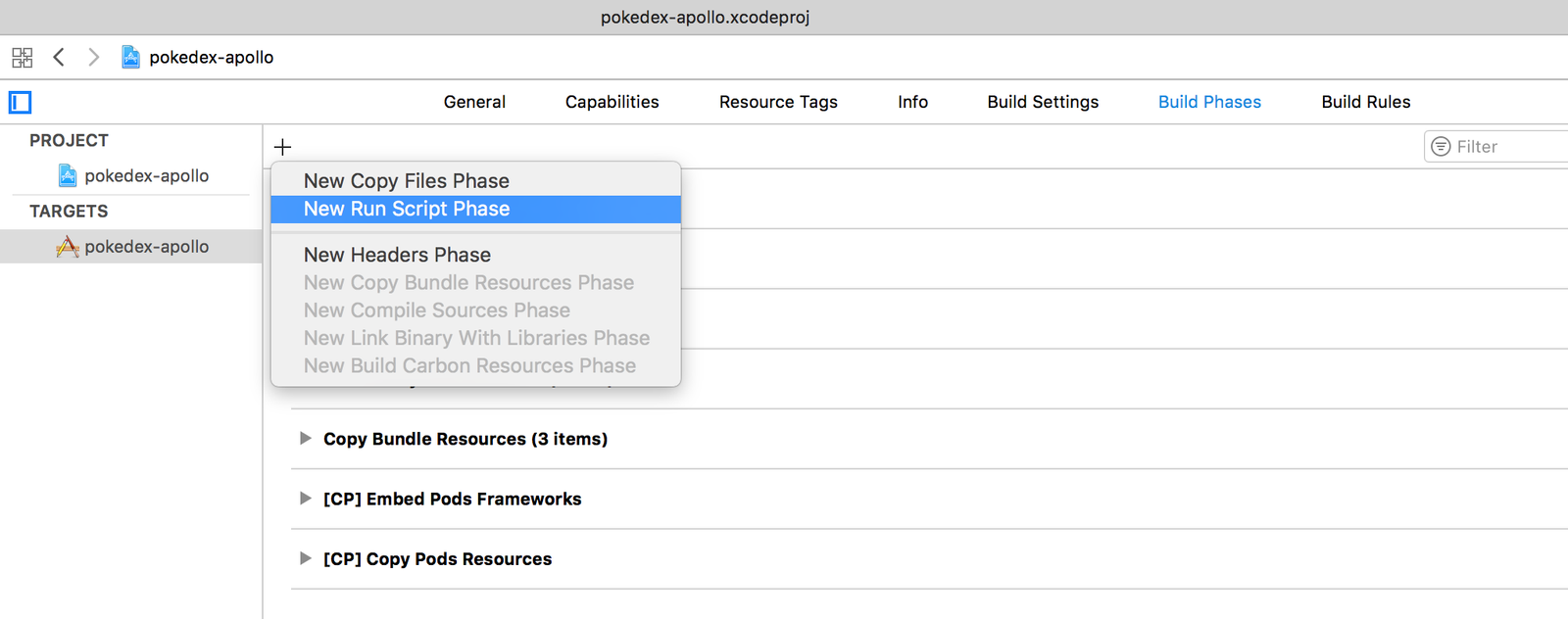
- Select the apollo-pokedex project in the Project Navigator
- Select the only application target called apollo-pokedex
- Select the Build Phases tab on top
- Click the + button on the top left
- Select New Run Script Phase from the menu that pops up
- Rename the newly added build phase to Generate Apollo GraphQL API
- Drag and drop the build phase to a new position right before Compile Sources
- Copy the following code snippet into the field that currently says: Type a script or drag a script file from your workspace to insert its path
APOLLO_FRAMEWORK_PATH="$(eval find $FRAMEWORK_SEARCH_PATHS -name "Apollo.framework" -maxdepth 1)"

if [ -z "$APOLLO_FRAMEWORK_PATH" ]; then
  echo "error: Couldn't find Apollo.framework in FRAMEWORK_SEARCH_PATHS; make sure to add the framework to your project."
  exit 1
fi

cd "${SRCROOT}/${TARGET_NAME}"
$APOLLO_FRAMEWORK_PATH/check-and-run-apollo-codegen.sh generate $(find . -name '*.graphql') --schema schema.json --output API.swift
- This code will now run
apollo-codegenbefore compilation and generate a file calledAPI.swift. Verify your settings look like this: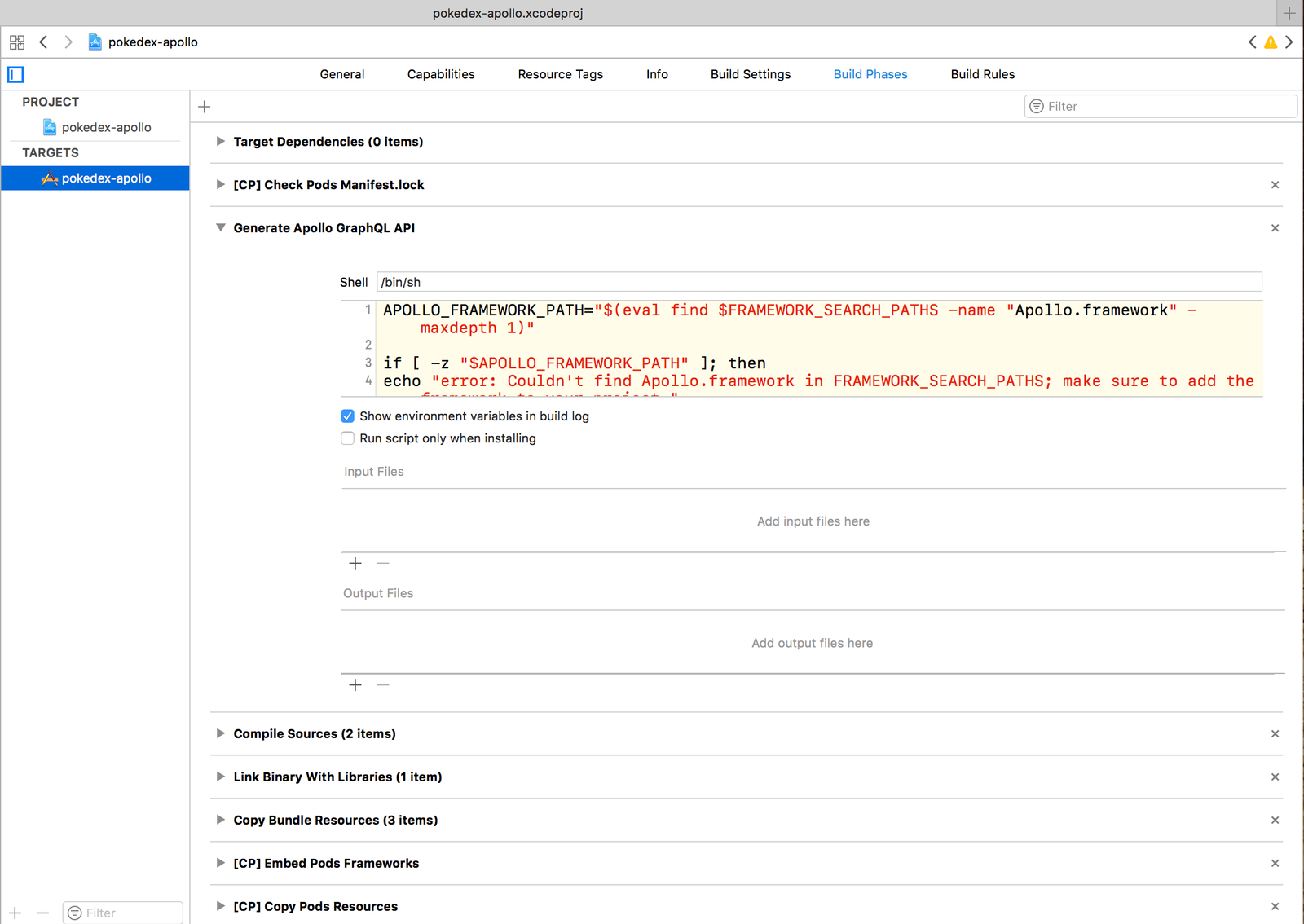
Note: If you're running into a versioning issue with the
Apollodependency that is installed from Cocoapods andapollo-codegen, make sure you have the latest versions of both installed. If Cocoapods fetched an older version ofApollo, runpod updateto solve the issue.
From the Apollo iOS Guide: The script above will invoke
apollo-codegenthrough thecheck-and-run-apollo-codegen.shwrapper script, which is actually contained in theApollo.frameworkbundle. The main reason for this is to check whether the version ofapollo-codegeninstalled on your system is compatible with the framework version installed in your project, and to warn you if it isn’t. Without this check, you could end up generating code that is incompatible with the runtime code contained in the framework.
If you already built the project you might have noticed that the promised API.swift file has already been generated. However, it only exists on the file system in the root directory of your project and is not part of the actual Xcode project yet (we'll take care of that in the next exercise). Also, the file is still empty because we didn't add any GraphQL queries or mutations yet, so there is nothing to generate.
Note: When you're setting up your own Apollo project, you'll have to provide a
schema.jsonfile that contains the GraphQL schema you want to use. In this tutorial, we included that file for you already. Find more info about how to generate this file here.
Instantiate the ApolloClient
Next, we want to instantiate the ApolloClient so that we can start making requests against our GraphQL API. For the purpose of this tutorial, we will create a global instance of the ApolloClient in AppDelegate.swift. Therefore, we first need to import the Apollo framework with import Apollo (which you can add directly below import UIKit):
COPY THIS SNIPPET
copy to AppDelegate.swift
import Apollo
Then add the following two lines after the import statements:
COPY THIS SNIPPET
copy to AppDelegate.swift
let graphlQLEndpointURL = "https://api.graph.cool/simple/v1/__PROJECT_ID__" let apollo = ApolloClient(url: URL(string: graphlQLEndpointURL)!)
Make sure you use the correct URL that represents your Pokedex sandbox. If you signed in via GitHub, the project ID in the URL should have been set for you automatically.
The ApolloClient we instantiated above can now mainly be used for two different things:
- fetching data with queries (using its
fetchmethod) - updating data with mutations (using its
performmethod)
That's it for this lesson! Make sure everything is set up properly until this point by running the project in a simulator.
Recap
In this lesson, we learned how to configure the environment and set up the Apollo iOS client:
- The Apollo iOS client can be installed via Cocoapods or Carthage
- Its usage however requires some further configuration:
- Adding a build phase to invoke
apollo-codegen - Having the
schema.jsonfile available in your project
- Adding a build phase to invoke
apollo-codegenwill run at every build before compilation and generateAPI.swiftthat contains all your GraphQL types